Curated Resources
English for IT: 10 Tech Blogs and a Practical Reading Method
Named tech media as English practice for busy developers: 10 sources ordered by difficulty, a comparison table, which workplace phrases to lift, and a 15-minute session loop.
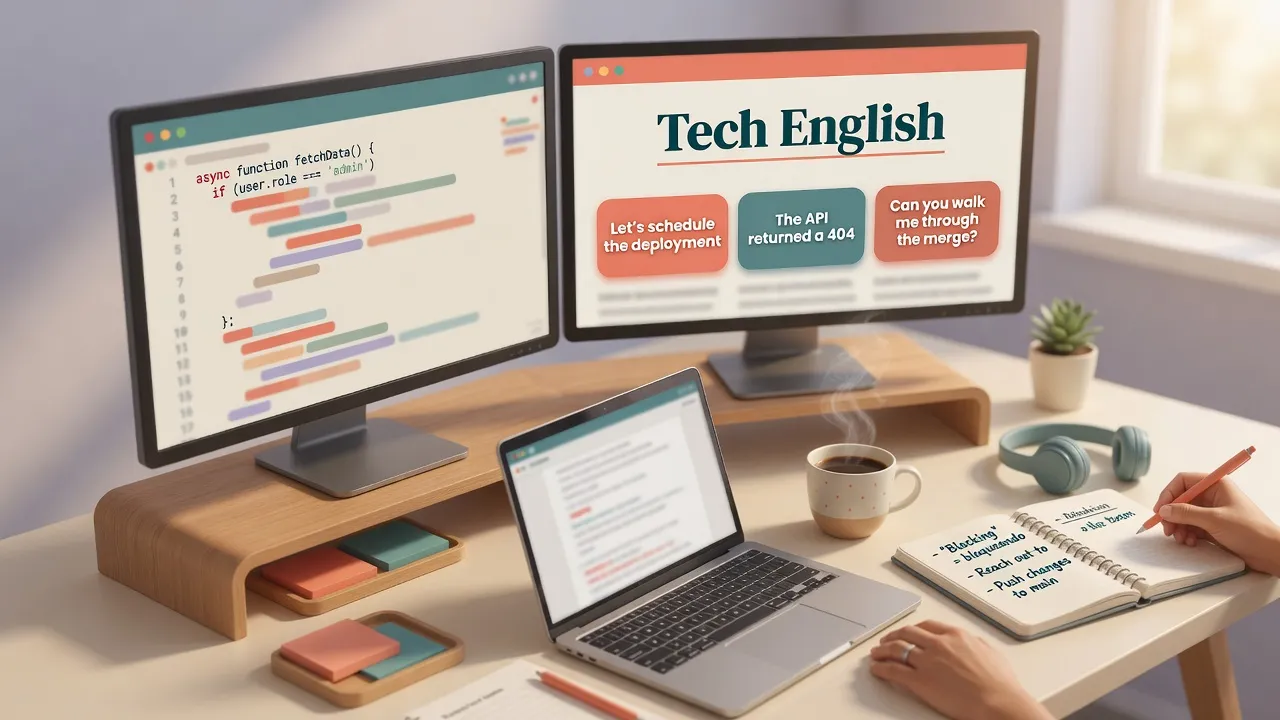
You read Stack Overflow, GitHub issues, and API docs all day. English is already "everywhere" at work. Be honest for a second: how many phrases did you deliberately keep last month? Passive scroll is not the same as active workplace English.
The language you need for code review, stand-up, and stakeholder email often lives outside the README. It lives in how engineers argue trade-offs, hedge opinions, and explain impact. That register shows up in quality tech blogs - if you treat them like a curriculum instead of a tab graveyard.
For English for IT, treat named tech blogs as a curriculum: start softer sources (Dev.to, CSS-Tricks / Smashing), then company eng blogs and Fowler-style essays, then denser HN comments and MIT Technology Review. Extract workplace language - collocations, hedging, trade-offs, stakeholder talk - not every unknown lemma. Run a 15-minute session (gist → 3-7 phrases → short output) a few times a week. Tools can help with graded warm-ups and phrase drills; none of this needs a browser extension that "imports any TechCrunch tab."
What you get from this guide:
- Why docs alone rarely cover career and cross-team English
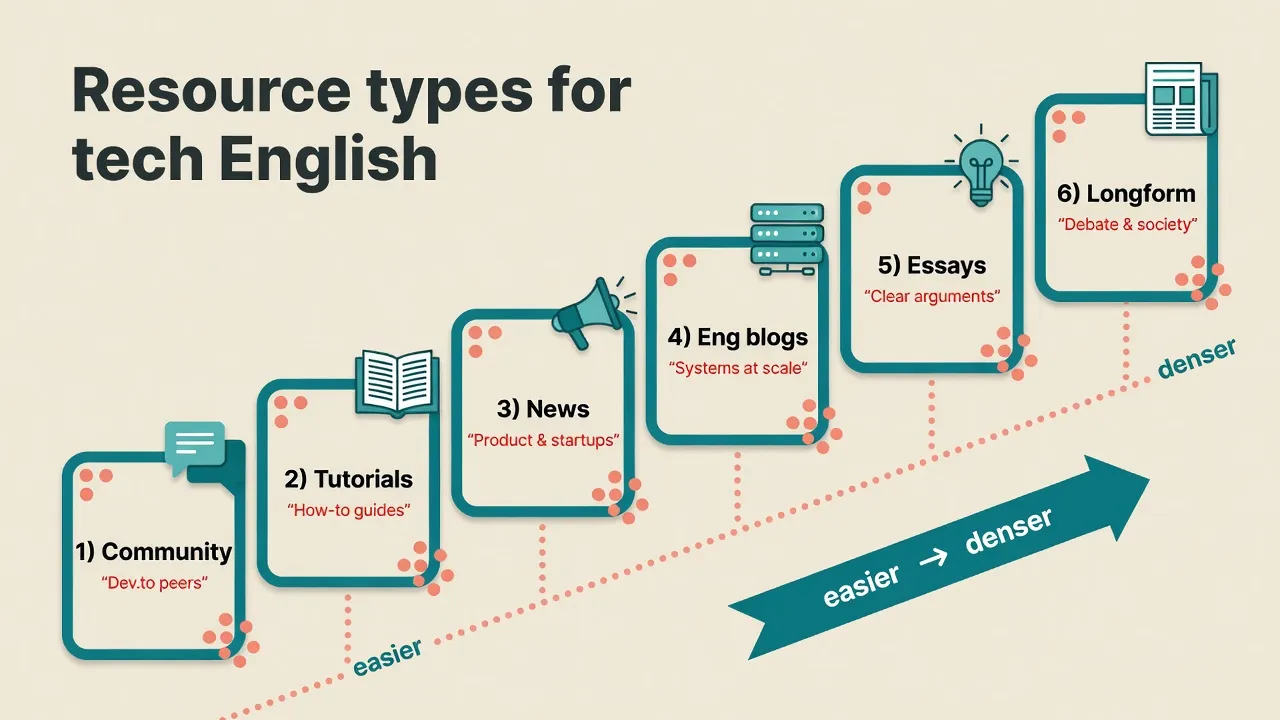
- 10 named sources ordered by difficulty feel (ladder, not random "best of")
- A clear extraction table: what to lift, what to skip
- A 15-minute session loop plus a simple weekly plan
- How to practice with MovaReader, starting on the free plan
Why is documentation English not enough?
Docs are a real skill layer. They teach error messages, API shapes, and how to write a clear commit. For many coding tasks, that layer is enough.
Workplace gaps show up elsewhere:
- Business collocations: trade-off, scope, stakeholder, alignment
- Soft disagreement instead of blunt "this is wrong"
- Argument connectors that hold a design answer together
- Explaining a technical choice to a non-engineer without drowning them in jargon
Quality tech blogs mix code with product, career, and persuasion. That mix is the missing register for interviews, promotion packets, and cross-team updates.
If you want a rough sense of how vocabulary size and CEFR-style bands relate, the language map and our note on how many words CEFR levels tend to imply are useful orientation.
10 tech blogs for English practice (difficulty ladder)
Here the list is ordered easier start → denser. Best-for means best for English practice, not "best blog for systems design skill only."
One glance first - then short notes on each source:
| # | Resource | Best for | Difficulty feel | Vocab focus |
|---|---|---|---|---|
| 1 | Dev.to | conversational tech English | B1-B2 start | how engineers explain to peers |
| 2 | CSS-Tricks / Smashing Magazine | tutorial / how-to English | B1-B2 | clear teaching register |
| 3 | TechCrunch | product + startup news | B1-B2 | pivot, runway, enterprise SaaS, launch |
| 4 | The Pragmatic Engineer | career / levels / big-tech culture | B2 | comp, RSU, promotion packet, scope of impact |
| 5 | Netflix Tech Blog (+ similar eng blogs) | systems at scale | B2 | latency, throughput, graceful degradation, cost |
| 6 | Martin Fowler | precise design definitions | B2 | expository structure; ADR/RFC tone |
| 7 | Paul Graham essays | persuasive simplicity | B2 | short theses; pitch/email clarity |
| 8 | Hacker News (+ comments) | argumentation / hedging | B2-C1 | I'd argue…, in practice…, incentive structure |
| 9 | Ars Technica | longform tech journalism | B2-C1 | reading stamina; analytic prose |
| 10 | MIT Technology Review | tech + society / policy | C1 denser | ethics, impact, non-eng audiences |
Start here if you are roughly B1-B2: Dev.to, CSS-Tricks / Smashing, and short company eng-blog posts. Leave dense HN comment wars and MIT Technology Review as stretch reads until B2 feels solid. For a gentler reading habit on graded texts, see building B1 vocabulary by reading.
How the types sit on the ladder (community and tutorials first, society prose last):
1. Dev.to
Best for community English - how engineers talk to each other in public, without corporate polish. Difficulty feel is the softest start on this list for many B1-B2 readers.
Watch phrases like "how I built…", "what broke in production", and simple explanations of tools. If pure docs feel dry and Fowler feels dense, start here for a few weeks.
2. CSS-Tricks / Smashing Magazine
Best for tutorial and how-to English: step scaffolding, "here's how / first / next / avoid". Difficulty stays in a friendly teaching register (still roughly B1-B2 for many posts).
You do not need to be a frontend specialist. The win is learning how clear writers break a complex topic into steps you could reuse in docs, onboarding notes, or a short internal guide.
3. TechCrunch
Best for product and startup news language that product and engineering share in the same meeting. Difficulty feel is news prose, usually approachable at B1-B2 if you skip jargon rabbit holes.
Collect units like pivot, runway, enterprise SaaS, fundraising, launch. Notice how one paragraph often glues product story to technical claim - useful for syncs and stakeholder updates.
4. The Pragmatic Engineer (Gergely Orosz)
Best for career English: levels, compensation talk, big-tech culture, and how teams describe impact. Difficulty lands around B2 for most pieces.
Phrase bank: total compensation, RSUs, promotion packet, scope of impact. Ideal when interviews, leveling, or manager-path conversations are on your calendar.
5. Netflix Tech Blog (and similar company eng blogs)
Best for systems-at-scale English: reliability, cost, and trade-offs written for peers. Difficulty feel is solid B2.
Mine phrases such as at scale, latency, throughput, graceful degradation, cost structure. This is the register of design docs, on-call write-ups, and system-design interviews. Stripe, Uber, and other eng blogs play a similar role if Netflix is not your flavor.
6. Martin Fowler
Best for precise design definitions and clean exposition. Difficulty is B2, with a careful, almost textbook clarity that rewards slow reading.
Copy the structure more than the rarest nouns: tight definitions, logical connectors, ADR/RFC tone. If you write design docs or architecture notes, Fowler is a style gym, not only a content feed.
7. Paul Graham essays
Best for persuasive short form - short theses, little fluff, opinions that still feel structured. Difficulty stays around B2 if you take one essay at a time.
Useful when your emails and pitches sprawl. Steal the habit of one clear claim early, then support, not a wall of background before the point.
8. Hacker News (especially the comments)
Links are useful. Comments are often richer for English practice: soft disagreement, hedging, and incentive talk. Difficulty spans B2-C1; threads can get dense fast.
Lift patterns like I'd argue that…, in practice…, the incentive structure…. Skip this as your daily main track if early B2 still feels shaky - use it for stretch argumentation once a week.
9. Ars Technica
Best for longform tech journalism and reading stamina. Difficulty is B2-C1: sustained analytic prose over many paragraphs.
When short posts already feel easy, Ars trains you to hold an argument across sections - the same stamina you need for specs, RFCs, and deep research notes.
10. MIT Technology Review
Best for tech plus society and policy: ethics, long-term impact, audiences outside pure engineering. This is the C1 denser band of the list.
Do not make it your first daily habit. Treat it as later-band practice when you need language for staff talks, public writing, or non-engineer stakeholders who care about impact, not only APIs.
What should you extract from an article?
Not every unknown word. A session works better with a cap of about 5-10 units, and phrases beat isolated lemmas almost every time.
Here is the extraction map:
| Target | Examples | Why |
|---|---|---|
| Collocations | ship a feature, on-call rotation, root cause | Sounds natural |
| Hedging | it seems, arguably, in many cases | Senior tone; less blunt |
| Trade-off language | we traded X for Y, the cost is… | System design / interviews |
| Stakeholder talk | alignment, impact, risk, timeline | Emails and meetings |
| Connectors | that said, in practice, as a result | Structure of answers |
If a rare lemma will never leave your mouth this month, skip it. Save high-value phrases where you can review them later - for example in saved phrases. For more on not drowning in unknown words while reading, see vocabulary for reading comprehension.
A 15-minute method for busy developers
You do not need a three-hour Sunday binge. You need a small loop you will actually run.
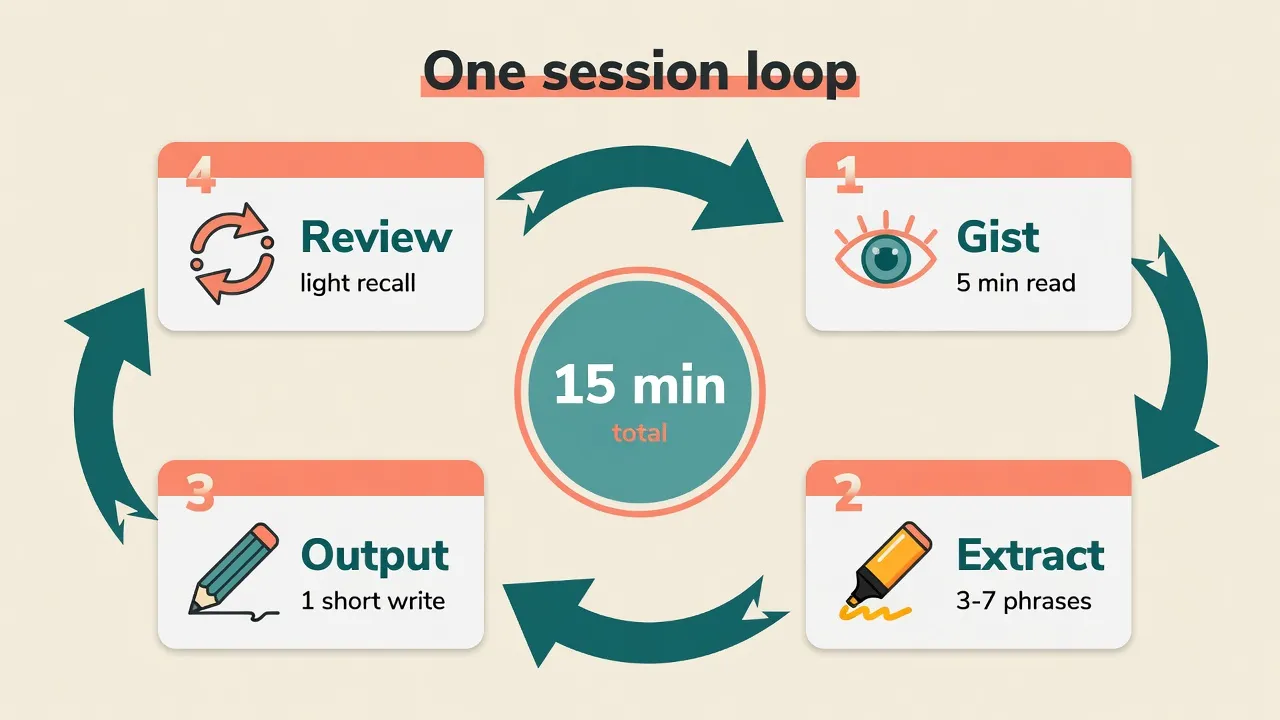
One session (15 minutes)
- 5 min - pick + gist. Open one article from your band of the ladder. Read for the main claim only. No dictionary marathon.
- 7 min - second pass + phrases. Underline or note 3-7 workplace phrases (collocations, hedges, trade-offs). Prefer units you might say in review or stand-up this month.
- 3 min - short output. Write one own sentence, or a 4-5 line summary, in English. That output is what makes the session stick.
The loop in one picture:
Optional warm-up before a hard blog: a short graded English text from the free library, such as an English A2 sample in All Articles. Warm-up first; live blog second.
Weekly source plan
Protect five short sessions. Prefer about fifteen phrases you will actually use over a "30-50 new words a week" KPI.
| Day | Source type | Focus |
|---|---|---|
| Mon | TechCrunch / industry news | product + business |
| Tue | Dev.to / tutorial | how-to explanations |
| Wed | Paul Graham / short essay | clarity |
| Thu | Company eng blog | systems language |
| Fri | HN comments | argumentation |
Swap days if your job needs more systems English than startup news. Keep the shape: variety across the week, not five identical TechCrunch tabs.
B2 vs C1 in real workplace situations
Reading supplies templates. Speaking and writing activate them. C1 is role-dependent - not a magic ticket required for every international job.
| Situation | Weaker | Stronger |
|---|---|---|
| Code review | "This is bad" | "This couples the service layer to storage details and will make testing harder" |
| Interview | "I used React and Node" | "I built a real-time feature over WebSockets and planned fallback behavior for flaky networks" |
| "Fix this bug" | "Could you check the checkout latency spike after the cache change?" | |
| Design talk | "Our system is fast" | "p99 improved after we moved this path to an event-driven flow" |
Weaker lines are not "wrong English." They are blunt and under-specified. Stronger lines show cause, constraint, and impact - the same moves good eng blogs and design essays model every week.
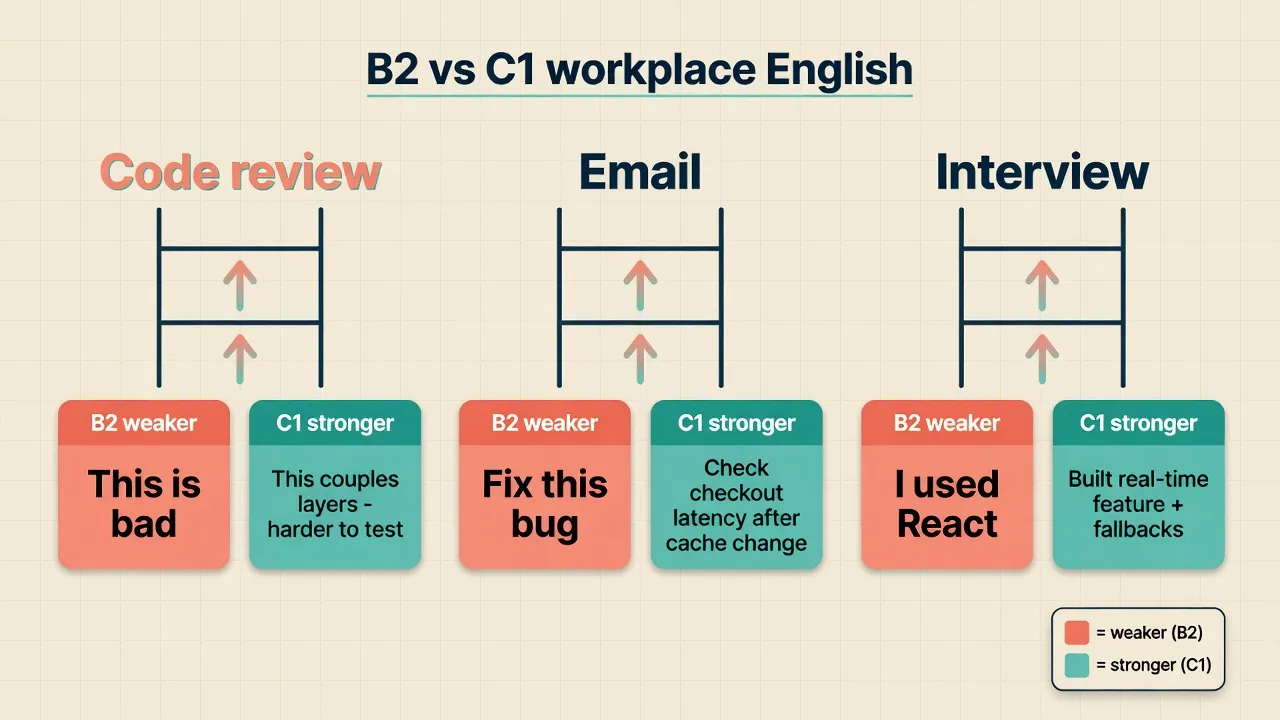
Many IC roles run well on solid B2 plus clear technical English. Staff, eng-manager, and public-writing roles usually benefit from a wider, more C1-like range. Language alone still does not guarantee the job.
Typical IT English mistakes (short list)
Seeing correct forms across many articles makes them sound normal. A few high-frequency fixes:
- I am working here since 5 years → I've been working here for five years
- discuss about → discuss
- The deploy was successfully → The deployment was successful
- I suggest to use → I suggest using / I recommend that we use
- Word-order calques in long trade-off explanations → mirror patterns from eng blogs and Fowler-style essays
Do not turn this into a shame list. Notice the pattern once, then hunt the better form in your next reading session.
How to use MovaReader
A simple routine for this kind of practice:
- Warm up on free graded English texts in All Articles (for example a short A2 sample).
- Read live tech media in the browser - TechCrunch, HN, company eng blogs, Fowler, and the rest stay on the open web.
- Move selected sentences or phrases into practice, or upload rights-cleared files you own (EPUB, notes, material you may use). See how to use.
- Tap blockers only - not every code term you already know from docs.
- Save phrases and run light drills via phrase typing demo, type training demo, trainers, and phrases.
Plans, said plainly:
- Free plan: graded library, unlimited listening, about 20 word translations per day - enough for warm-ups and light sessions.
- Reader (€1): unlimited reading translations when denser text or own files need more look-ups.
- Pro (€5/mo): full trainers when reviewing saved collocations and hedges is the bottleneck.
Details live on pricing. Tools reduce friction. They do not turn C1 policy prose into A2 overnight.
A better loop than "read and close"
Old cycle: open → understand about 80% → close → forget.
Better cycle: gist → 3-7 high-value phrases → short output → light review in 1-3 days.
IT-shaped outputs that fit real work:
- three code-review bullets
- a five-line design trade-off
- a 60-90 second spoken interview answer
If you only remember one habit: finish with output. Understanding alone is quiet; output is the proof you can use the phrase later.
FAQ
Which blog is best to start at B1-B2?
Start with Dev.to, CSS-Tricks / Smashing Magazine, and short company eng-blog posts. They teach how engineers explain things without the densest policy or debate prose. Leave dense HN comment wars and MIT Technology Review for later - stretch, not your daily main track, until B2 feels solid.
Is reading only documentation enough?
For coding tasks - error messages, APIs, commit clarity - documentation is often enough. For career talks, interviews, cross-team email, and stakeholder updates, you also need business collocations, soft disagreement, and trade-off language. Quality tech blogs mix code with product, career, and persuasion - that missing register.
Do I need C1 for an international tech job?
It depends on the role. Many IC roles run well on solid B2 plus clear technical English. Staff, eng-manager, and public-writing roles benefit more from a C1-ish range. Language alone does not guarantee the job.
How do I not drown in unknown words?
Skip rare low-value lemmas you will never say at work this month. Lift phrases (collocations, hedges, trade-offs) you will reuse in reviews or stand-ups. Cap a session at about 5-10 units, not a full dictionary dump. The vocabulary for reading comprehension post digs into the same problem.
Can MovaReader one-click import any web article?
No. There is no browser extension that imports any TechCrunch (or other) tab into your account. What is real: a free graded library, upload of rights-cleared files you own, click-translate on blockers, and phrase trainers. For live news sites, read in the browser and move selected sentences or phrases manually or via your own files. How to use and All Articles are good starting points.
How much time per week makes sense?
5 × 15 minutes (about 75 minutes a week) beats a rare weekend binge. Protect the habit over prestige volume. Prefer about fifteen phrases you will actually use over a "30-50 new words a week" KPI.
Next steps
- Pick 2-3 sources on your band of the ladder, not all 10 at once.
- Protect 5 × 15 minutes before a weekend binge.
- Save phrases you will use this month - collocations and hedges first.
- Today: free graded warm-up in All Articles (try an A2 sample) → one real blog session from your band → pricing only when you hit a real translation limit.
- When progress should stick across devices, create an account is enough; no need to buy first.
- Optional deeper reading: psychology and self-development books in original English if you want another English ladder outside pure tech media.
Tools reduce friction. They do not turn C1 policy prose into A2 overnight. Pick a few sources, run the 15-minute loop, and keep the phrases you will actually say at work - not every tab you open.
Learning English?
The English version of MovaReader teaches Spanish and Ukrainian. To read English with a translation for every word, open the reader in Ukrainian or Spanish:
Книги англійськоюЦя стаття українськоюLibros en inglésEste artículo en español